Author: skp_admin

  • Book Lover got love!

    My goal this year has been about exposure: showcasing more of the work I’ve been doing on my own to a public audience.

    And I’ve been doing it. I have this blog up. I publish every week (it’s only been 6 weeks, but hey, it’s infinitely more than zero). I even demo’d a build to my boss on a 1:1 meeting.

    Today, I showcased a desktop app I’ve been building called Book Lover. I am a reader. I read words, I read fast, I read good-ish. I love books. My parents like to say I was half-raised by schools, and another half by libraries, and honestly that explains quite a few things about me. Anywhere I go I have a book. It used to be a physical book in the days before iPads and Kindles. And during my globe-trotting days it was on a larger screen iPhone of some sort. Nowadays it’s a mix of both and my personal library is a barely contained chaos of paper and ink.

    Needless to say, buying, borrowing, and organizing books is a life-long habit. The number of books I want to read, come across as recommendations to read, and daydream about reading numbers in the hundreds, if not thousands. If I were to win the lottery, I’d travel the world to find unique places to sit and read like a ridiculous Green Eggs & Ham for an introverted middle-aged ma.

    “I WOULD, DEFINITELY WOULD IN A TREE.
    IN A CAR! LEAVE ME BE to read.
    I WOULD READ THEM IN A BOX.
    I WOULD READ THEM WITH A FOX.
    I WILL READ THEM IN A HOUSE.
    EVEN IF IT HAS A MOUSE.
    I LIKE READING HERE AND THERE.
    I WILL SERIOUSLY READ ANYWHERE.
    I’D LIKE TO READ BOOKS AND TRAVEL LATAM.
    I WANT TO READ AND TRAVEL THE WORLD, FOR SREE I AM.

    A TRAIN! A TRAIN! A TRAIN! A TRAIN!
    COULD YOU, WOULD YOU ON A TRAIN?”

    Yeah, of course, duh, see the above. Sleeper car with a big window. EuroRail through the Alps?

    Sign. Me. Up.

    Now, what I will not do, Sree I am, is deal anymore with the Goodreads and Amazon sham. It’s been a pain finding books, having to search in Goodreads and then add them to an Amazon list. And then periodically go back and cycle through various searches and sites to find the best option: do we go with Apple eBooks, Kindle, Amazon used (if available) Thriftbooks, Libby, etc? Each search takes time, takes mental space, and if you do purchase outside of the Amazon list, you have to manage the list itself.

    I also don’t like giving Amazon that much of my data. My reading preferences feel significantly more personal than the supplements I take, the cleaning supplies I buy, or the excessive amount of glitter and markers I purchase (for my child, not myself…usually).

    So, I built Book Lover….well, I’m still building Book Lover. The MVP is mostly done. There’s some improvements to make. But here it is. I did this.
    https://www.loom.com/share/42b7d7867f4a4b35b99bdf21184e4b5f

    And then I showed it to a forum of strangers…and they loved it!

    So that made my year.

  • I love it when an ecosystem comes together…

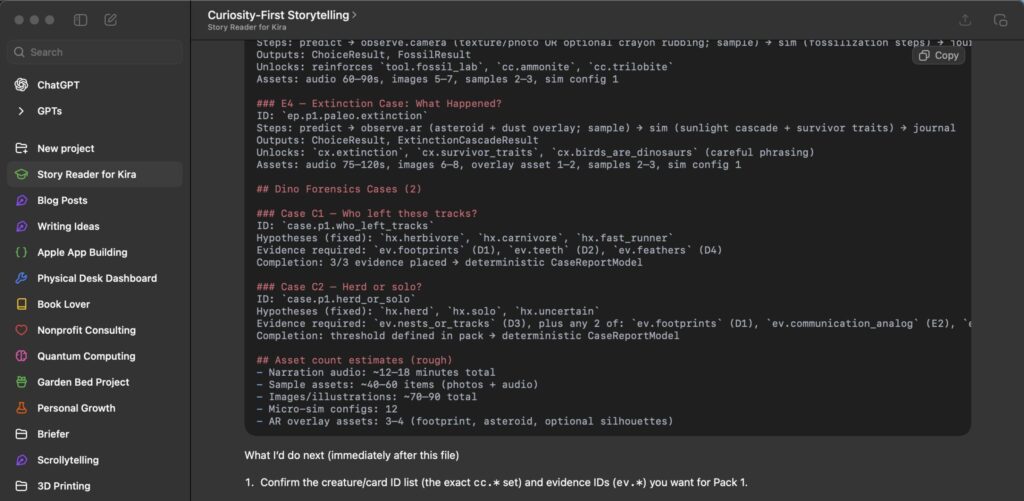
    This was originally going to be a short post about one week with Codex. But after a discussion on a chat forum about favorite coding agents, I realized I wasn’t a Codex fan because it was Codex and had some magical ability. No, it was the unification of several tools from OpenAI: ChatGPT, CodexCLI, and Codex Desktop.

    This article from OpenAI about Codex’s app server came around the time that Clawdbot took off and the contrast in the two toolsets struck me as odd yet familiar. It feels very much like an Android vs Apple showdown. Clawdbot lets you install and infinitely customize to your heart’s content: connect anything and everything to your choice of systems: both computing platform and communications platforms of choice. It’s completely up to you. It’s also, completely up to you. Security, iteration, development, etc.

    Contrast that with OpenAI’s approach: interconnected tools with the ability to easily switch between. Codex CLI, Codex Web, and Codex for Mac. Integrated with ChatGPT and a limited, but user friendly set of tools. Very Apple.

    I, personally, fall in camp Apple. I like the guardrails. The training wheels. I know enough to get myself in trouble and I want enough to stay out of trouble. For the most part, I can do that in an intuitive way with Codex and ChatGPT. I can upload and organize a file set and projects with ChatGPT. The pretty colors for icons make me happy (yes, I am that simple of a man).

    I can do my research, drag and drop into folders, and get helpful suggestions. I can add in memories, update my preferences and overall, slowly but surely customize the experience to my level of comfort. I even recently upgraded to a business license and was able to find easily accessible guides on how to migrate everything from my initial Pro plan to Business….there was a Button! So user friendly!

    And Codex. Oh how I love Codex.

    I love plan mode on the web.

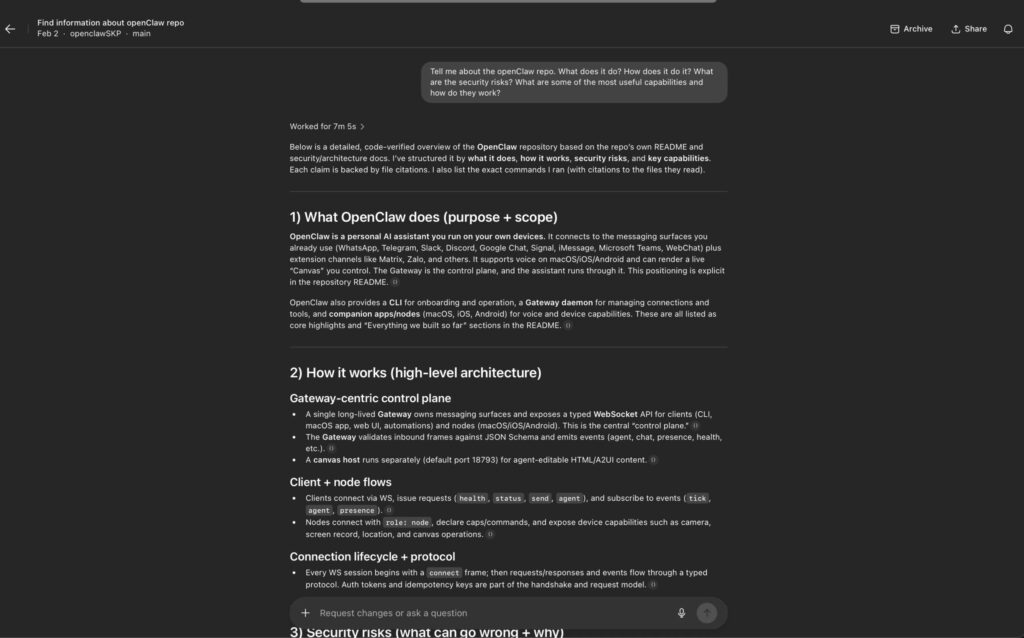
    It took me longer than I care to admit to learn a simple learning hack: fork a repo from a developer whose work you are curious about. Point Codex Web at the forked repo, and ask as many questions as you can to understand what’s going on. Ask about how it works, why it works, what the architectural principles are. Ask if it’s useful for your life (it pulls in your ChatGPT profile and memories as part of its assessment – which, for me, eloquently outlines my baseline need for explaining things like im five).

    And if you so choose, connect Github and build! The environment management, branch management are wonderful. Yes, it should be baked into every developers workflow. But I am not a developer. I am two raccoons and a lost toddler in a trench coat somehow gainfully employed in 21st century America.

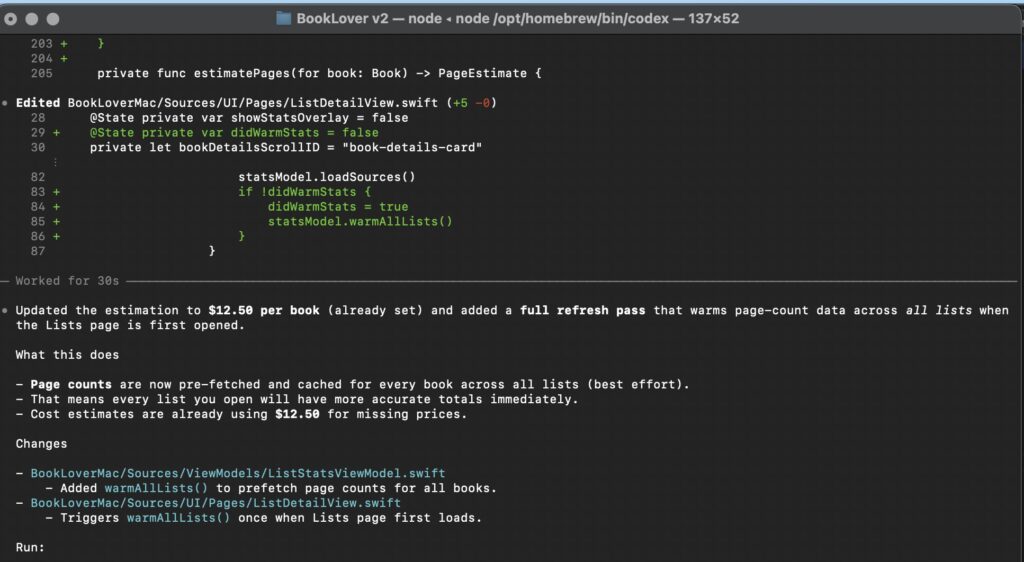
    And with that hard earned trust, I was persuaded to push my comfort zone into Codex CLI. Easy install, easy troubleshooting (python is mapped as python3 on my computer and doesn’t like npm for some reason), and together, we built things.

    I thoroughly enjoyed using the CLI. All the articles that I had read about “it’s all just files, man” and “TUI is the way to go”

    (TUI = Terminal UI…yes, it took me forever to decipher that one as well)

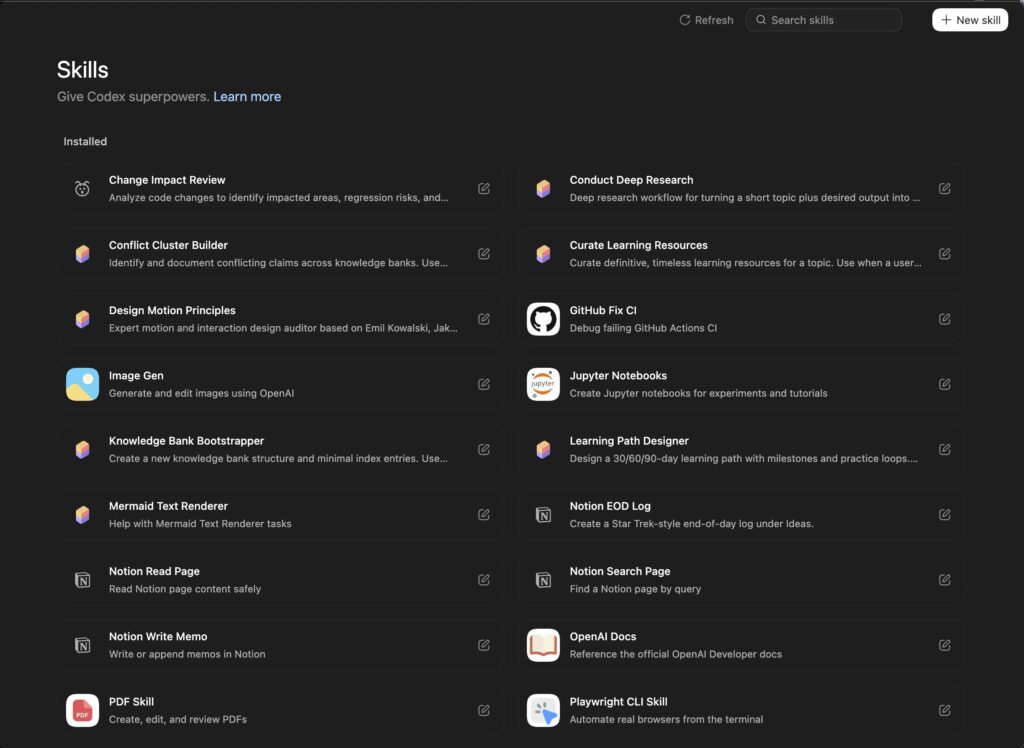
    We researched things. We built skills one at a time together. We worked on context windows and compaction and orchestration.

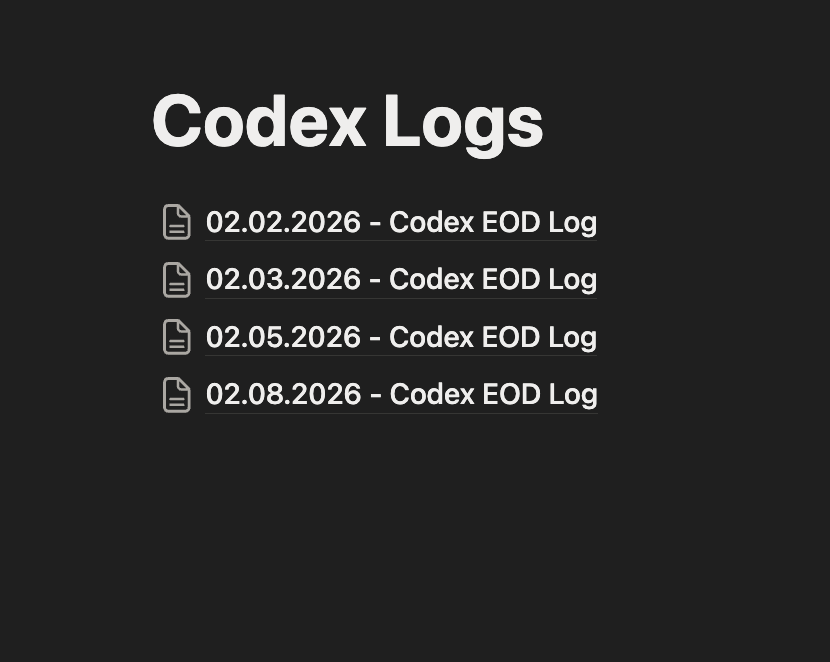
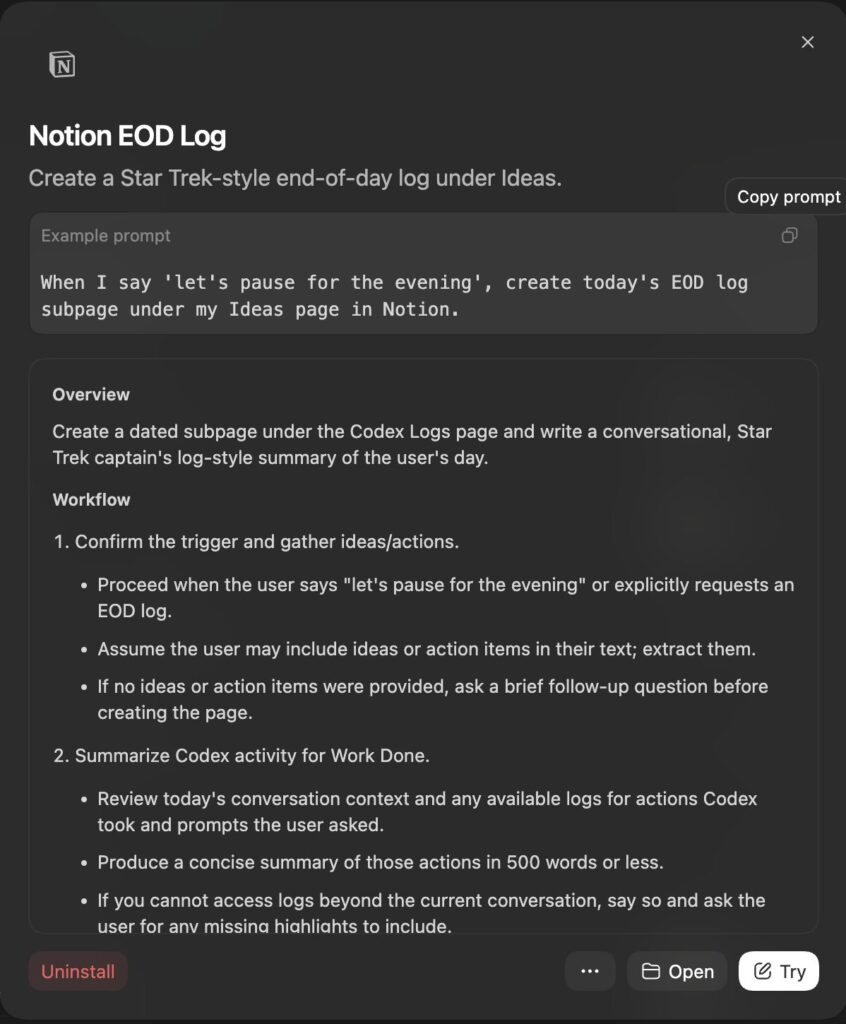
    I was even delicately handheld through setting up my first MCP and using it to create my Notion EOD log (see: Codex Codex on the Wall…)

    It all just….worked.

    In what I believe to be an extremely controversial take, I will say I loved NOT drowning in the chaos of the Claude Code universe: the skills vs agent debates, the Ralph loop hysteria, the multi-agent orchestration empires currently ruled over by Clawdbot and Gas Town and the like. It feels like listening to an F1 crew trying to convey wisdom to a newly licensed teen driver. You’re wisened, experienced, and trying to be helpful…I’m just trying to merge onto the highway and not die (both from an accident…and from embarrassment).

    I’m a simple guy:

    I like having a job where I sit at a computer and say things and somehow it pays my mortgage and affords me time and resources to blather on the internet like someone’s listening.

    I like the potential and promise of AI. It truly fascinates me that a corpus of knowledge of a species has been aggregated into a form that is accessible faster than the neurological constructs that produced it. It’s Fucking Wild.

    And, I like building cool shit with cool people.

    But, I’m an amateur. I’m not yet at a level where I can generate an ROI on my AI work, and I certainly don’t have the ears of any VCs. I don’t think I’m unique either.

    And so when Codex came out with the Desktop app, I was curious, and then thrilled. It not only was the desktop GUI experience that I didn’t know I needed, but it also bridged the web and CLI worlds so smoothly. My skills showed up! My planning showed up! My development work to date showed up!

    Could this have been done in other tools? absolutely. But with the Codex app, it was all there, done for me from day one. Again, it just worked. The baseline is taken care of. And with that I can take the advice of the pros: pick a tool and master it. I can move up one ladder with Codex a rung at a time.

    And eventually, see the forest for the trees.

  • Codex, Codex on the wall, explain me the workings of this function call…

    So, I think I’m a Codex Stan. Or, just too lazy to learn Cursor + Antigravity + Claude + Ralph Wiggum loops + OpenClaw + whatever is coming out of the woodwork these days. Yes, I do still check-in and dabble in other models, but there’s something elegant about a unified ecosystem with OpenAI. ChatGPT + Codex CLI + now, the Codex Mac Desktop app. It all fits together nicely. Also, I can’t justify $200 a month for a single subscription. Mostly that. So business plans with 2 seats for Codex works really really well for my wallet.

    And with it not being the most popular option, it does have a nice side benefit – I have to adapt everything I read to fit what I’m attempting to do. Which forces me to decompose and then recompose. TOML vs JSON, custom creation of skills (albeit still pretty damn easy with skill-creator and skills.md files at the core), and a different level of custom orchestration for multi-agent workflows.

    It’s fun. I’m learning. And for now, as the ecosystem works itself out, I tell myself that’s what matters. I’m not knowledgeable enough or positioned close enough to the bleeding edge to take advantage of the volatility. I’m working on an app that lets me keep track of books I want to buy – not writing new languages (looking at you Geoffrey Huntley).

    And so I did just that.

    I fired up Codex in a browser (Codex Cloud), navigated another tab to the OpenClaw repo, hit the fork button for maybe the second time in my life (yes, I said I’m learning – this is learning), and then asked Codex to explain the newly forked repo. And it told me about it. The features, how the Heartbeat works, security considerations, and how I could do something similar for my non-Telegram, non-WhatsApp using self.

    In retrospect, it’s so simple and obvious that I’m the only one who should be impressed.

    But wait, there’s more…

    I wanted to build a connection to my Notion site from the Codex CLI. I document all my ideas in Notion, I journal in Notion, I keep track of lists and feelings and statuses in Notion. If you forced me to choose between losing my iPhone or my Notion, I’d delete Notion off the phone and hand it right over without hesitation.

    And so I asked Codex to walk me through setting up the Notion MCP, creating a skill to read and write pages, and give me a brief tutorial on what it could or could not do.

    Codex chugged away, got me connected with the Notion MCP, and displayed a brief list of available tools. At that point, it was late in the night, and I have a routine before bed to plan my next day.

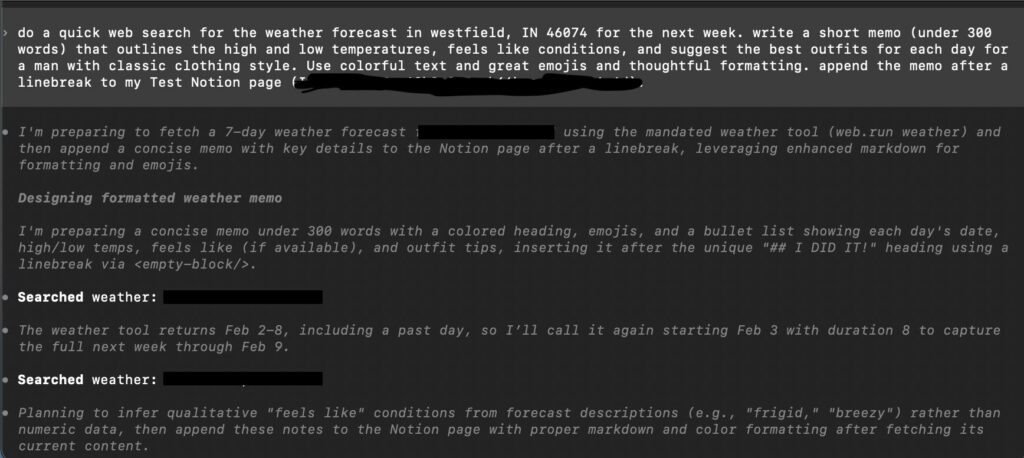
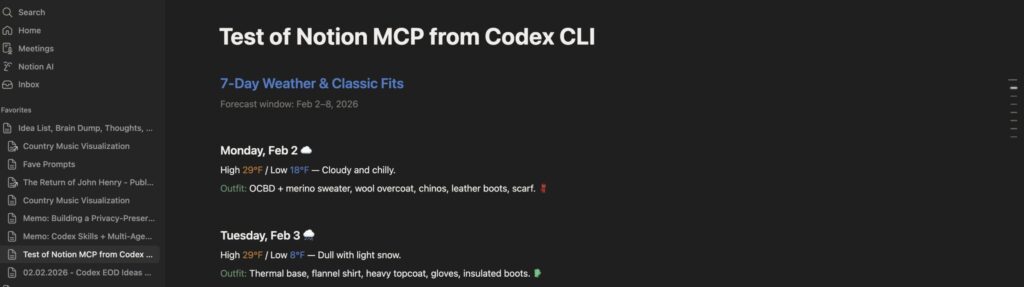
    And with this, I had an idea. Could I just ask Codex to write a memo for me? Something simple to start: check the weather for my area, suggest an outfit, format it all pretty, and show me in Notion. The iPhone app is one of the first things I check in the morning, and one of the last things I journal into at night so it’s a core information hub for organizing my thoughts and life.

    So I asked.

    A few minutes later this showed up:

    MAGIC!

    And now it’s a skill I can use whenever I want.

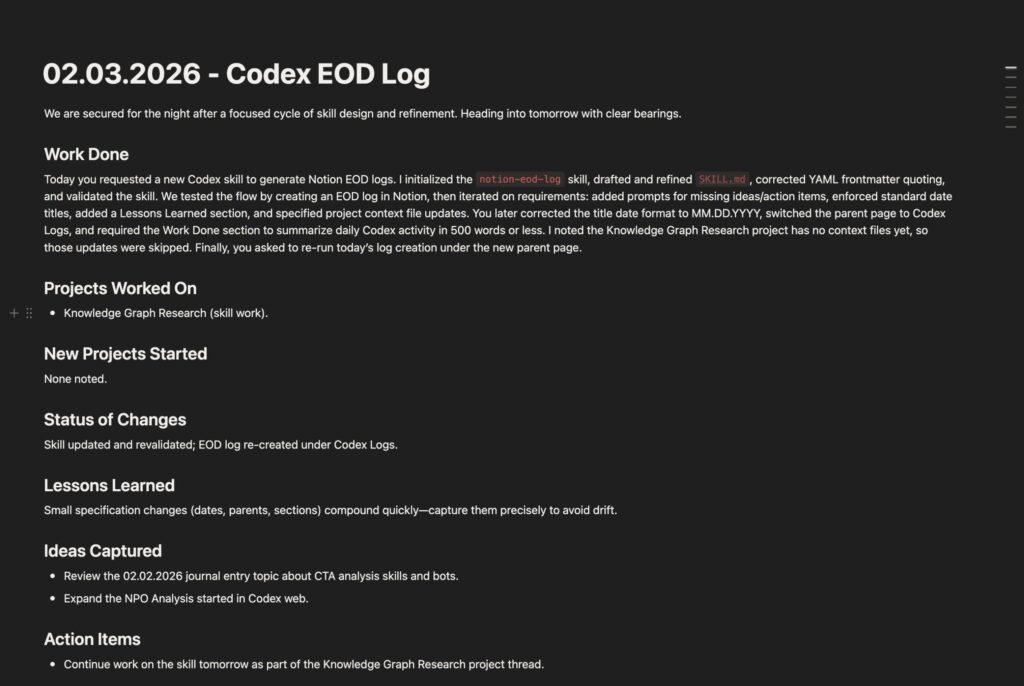
    Next step for me is automating it. I’ll work on a skill that writes an end of day briefing: a summary of what I worked on today (in Codex), some notes or ideas I want to add in, and a quick pre-cap of what tomorrow brings.

    Let’s see how it goes.

    Okay, never mind, it took like 30 minutes:

    MAGIC!!

  • Ain’t Nothing But a Country Thing

    While lobster red is all the hype right now through OpenClaw (fka Moltbot fka Clawdbot), I haven’t taken part. I’m curious to see how it evolves and what the scene looks like when the dust settles in a couple weeks.

    Speaking of dust, I’ve been on a bit of a country music kick lately. Nothing fancy: lots of pop country, some Garth Brooke, Keith Urban, and early Taylor Swift with Florida Georgia Line, Taylor Hubbard, Nate Smith, and others. And I definitely noticed the pattern: beer, dogs, trucks, and scorned love, and small town living. So, when guitar twang collided with AI agent, I came up with a small experiment: how prevalent is the common trope in country music? And with the trusty help of Codex CLI and some ChatGPT, I dove in to concocting a plan and building a visualization.

    As a side note, I have had a fascination with data science and data visualization. (not to brag, but I’ve had a Flowing Data membership since the beginning). Some minor experience through consulting work in PowerBI and Tableau at an enterprise level, but zero actual skill: just a not so quiet geeky admiration of the power of telling a good data backed story in the most human of senses: visualization.

    Here’s how it all went down (and yes, I got AI to write the post-mortem)

    Tag: Data

    • understand the zeitgeist from popular song lyrics

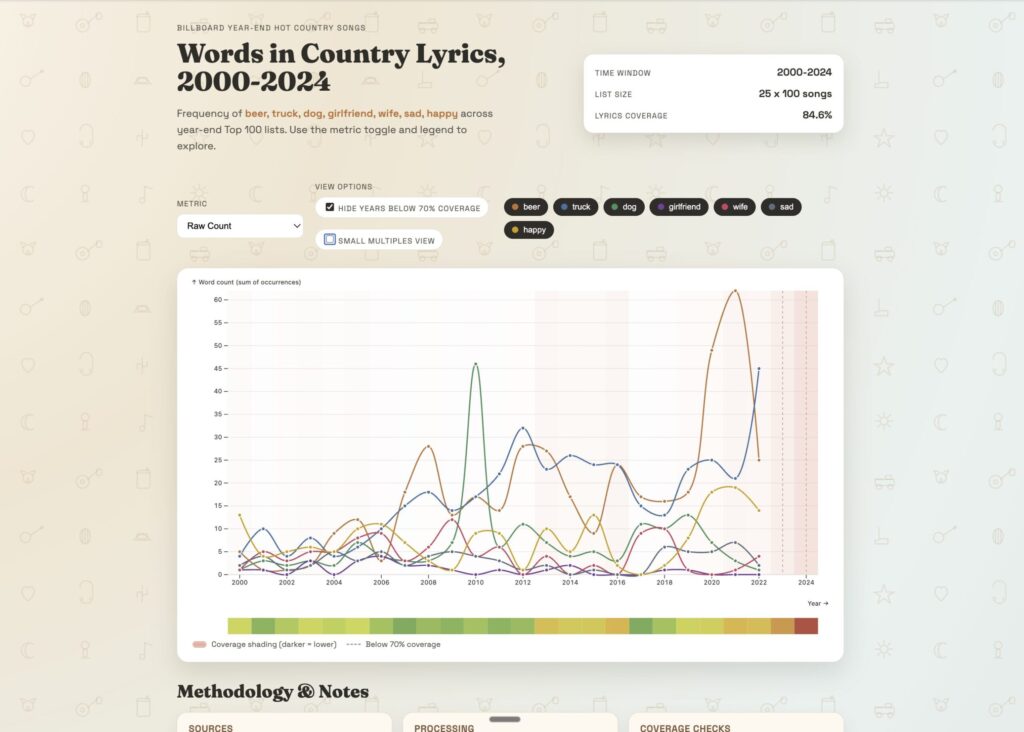
    Scope narrowing: I wanted to see the mentions of trucks, dogs, beer, and girlfriends in country music over the years. So, I figured I could pull a list of top 100 country songs since 2000, their lyrics, and do a keyword frequency search.

    This was harder than I thought. But here’s what a few hours of Codex came up with:

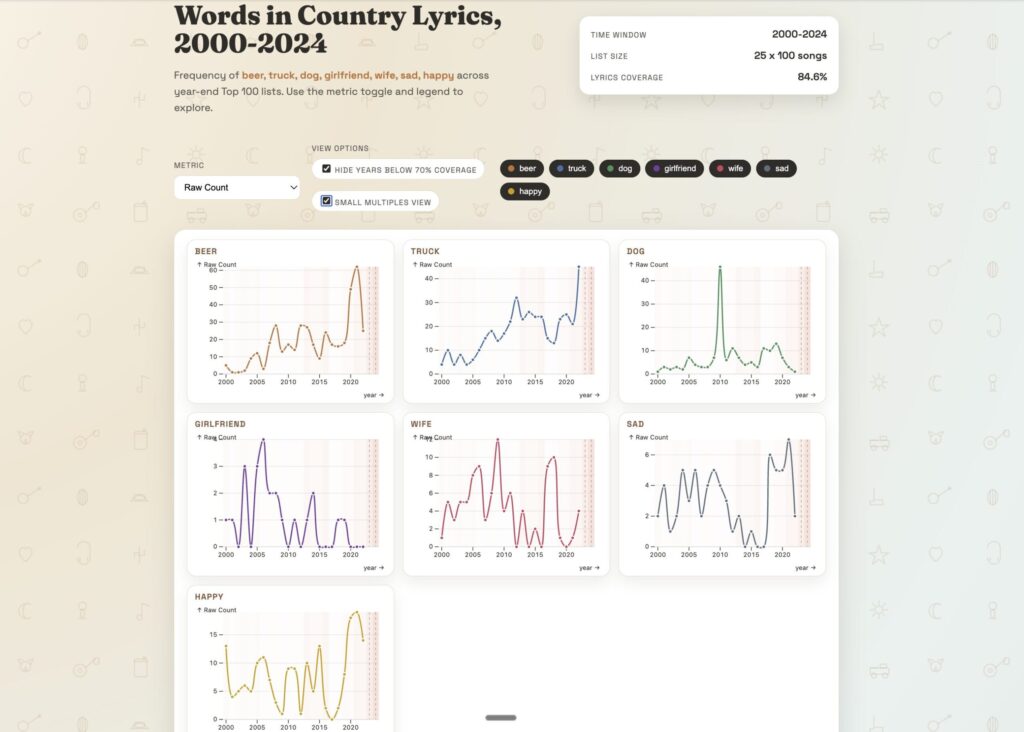
    and a cool split view

    I even got Codex to write a Post Mortem document in Markdown. Is the data accurate? Based on a quick assessment, I don’t think so; there appears to be some sort of bias towards the later years where words are overrepresented in the data sets. This could be because of incompleteness of lyrics, inaccurate lists, double counting, appends, etc.

    Country Music Visualization Project Post Mortem

    Executive Summary

    This project set out to visualize how frequently a small set of words (beer, truck, dog, girlfriend, wife, sad, happy) appear in the lyrics of U.S. country songs that appear on year-end Top 100 lists from 2000 onward. The end result is an interactive, Observable Plot-based visualization with multiple frequency metrics, legend toggles, and a coverage warning overlay. We achieved the required coverage threshold (>70%) by combining a licensed bag-of-words corpus (LyricFind) with a large supplemental lyrics dataset from Kaggle. The final coverage was 84.56% overall, with some years still below threshold, and those years are explicitly highlighted in the visualization.

    Concept and Goals

    Primary concept: A long-run view of thematic language in country music using a stable, chart-based song universe.

    Goals

    • Analyze the frequency of target words and their variants across time.
    • Use year-end Top 100 lists so each year is comparable.
    • Provide multiple metrics (raw count, per 10k words, % of songs with the word).
    • Require a minimum lyric coverage threshold of 70% before computing results.
    • Produce an interactive, lightweight HTML/JS visualization using Observable Plot.

    Scope Decisions

    • Years: 2000–2024 (Playback.fm has no 2025 list). Each appearance of a song in a given year is counted separately.
    • Target words: beer, truck, dog, girlfriend, wife, sad, happy with plurals and possessives.
    • Chart sourcePlayback.fm year-end Top 100 country lists (used as a proxy due to access constraints). This is not an official Billboard dataset.
    • Lyrics source: LyricFind corpus (bag-of-words) plus a Kaggle lyrics dataset to fill coverage gaps after 2013.

    Data Sources

    1. Playback.fm year-end country charts (2000–2024)
    2. LyricFind Corpus (bag-of-words)
    3. Kaggle supplemental lyrics dataset

    Planning and Workflow

    Planning steps

    • Define the list universe and target words.
    • Identify and validate data sources for chart lists and lyrics.
    • Implement a pipeline to build the song list, retrieve/ingest lyrics, compute metrics, and visualize results.
    • Enforce a minimum coverage threshold (>=70%).
    • Add transparency mechanisms (coverage report + visualization overlay).

    Scripts and artifacts

    • scripts/build_song_list.py: Builds year-end lists (Playback.fm parsing and other sources).
    • scripts/fetch_lyrics.py: Downloads/unzips LyricFind.
    • scripts/compute_word_freqs.py: Computes word metrics and coverage.
    • data/raw/year_end_country_songs_2000_2025.csv: Song universe (2000–2024 used).
    • data/processed/word_freqs_by_year.csv: Aggregated metrics by year.
    • data/processed/coverage_report.json: Coverage diagnostics by year.
    • viz/index.htmlviz/plot.jsviz/styles.css: Visualization.

    Methodology

    1. Build song universe
      • For each year, collect Top 100 country songs.
      • Normalize song titles and artist names.
      • Each song is counted per year it appears.
    2. Lyrics ingestion
      • LyricFind dictionary is used to map word IDs to tokens.
      • Lyrics file provides word IDs per lyric (bag-of-words).
      • Metadata maps lyric IDs to titles/artists.
      • Cross-reference file maps duplicate lyric IDs to distinct IDs.
    3. Supplemental lyrics
      • Kaggle dataset provides full lyrics for many tracks.
      • For songs missing in LyricFind, attempt matching by normalized title + artist.
    4. Word matching
      • Variants include plurals and possessives.
      • Matching is exact-token after normalization (lowercase, punctuation stripped).
    5. Metrics computed
      • Raw count of each word group per year.
      • Occurrences per 10,000 words per year.
      • Percentage of songs containing the word per year.
    6. Coverage enforcement
      • Compute overall and per-year coverage of songs with lyrics.
      • Exit if overall coverage <70%.
      • Add visual warnings for low coverage years.

    Execution Summary

    • Playback.fm parsing was done via browser automation due to sandbox networking constraints.
    • LyricFind corpus was manually downloaded and unzipped in the project directory.
    • Initial coverage with LyricFind alone was 45.92% (coverage dropped sharply after 2013).
    • Kaggle supplemental lyrics added 803 additional song matches.
    • Final coverage reached 84.56% overall.

    Coverage (selected years)

    • 2000–2012: ~80%+ coverage
    • 2013: 79%
    • 2014: 84%
    • 2015: 83%
    • 2023: 57%
    • 2024: 13%

    Visualization Features

    • Metric dropdown (raw count, per 10k words, % of songs with word).
    • Legend toggles by word category.
    • Coverage overlay: background shading by year (darker = lower coverage) plus dashed markers for years <70%.
    • Inline legend for coverage overlay.
    • Methodology and project notes section below the chart.

    Pain Points and Challenges

    1. Chart list reliability
      • Playback.fm is not official Billboard data. This introduces uncertainty in the actual chart universe.
    2. Lyrics availability
      • LyricFind corpus coverage drops sharply after ~2013.
      • Supplemental lyrics were required to reach 70% coverage.
    3. Environment constraints
      • Network restrictions prevented direct downloads and scraping.
      • Manual downloads and browser scraping were needed.
    4. Matching accuracy
      • Title/artist normalization can mis-handle remixes, alternate names, and common titles.
      • Matching errors can introduce false positives or missed matches.

    Lessons Learned

    • Coverage transparency is essential; a clean overlay prevents misleading interpretations.
    • Mixing data sources is practical but must be disclosed (format and provenance differ).
    • Normalization rules matter as much as the source lists; artist disambiguation is critical.
    • A robust pipeline needs versioned artifacts and per-year validation checks.

    Data Accuracy Assessment

    Strengths

    • Strong coverage for 2000–2012 and many mid-years after supplementation.
    • A clear, repeatable matching methodology and consistent metrics.

    Limitations

    • Playback.fm may diverge from Billboard year-end data.
    • Kaggle lyrics dataset may include non-country songs and varying metadata quality.
    • 2023–2024 have low coverage, and values for those years are likely undercounted.

    Narratives the Visualization Supports

    • Broad trend comparisons for target words over time.
    • Relative prominence of certain themes (e.g., beer vs dog vs sad) in charting country songs.
    • Periods of shift in language emphasis across decades.

    Are These Narratives Accurate?

    • Mostly accurate for years with high coverage (especially 2000–2012, 2014–2022).
    • Potentially inaccurate for 2023–2024 due to low coverage.
    • Potentially biased if Playback.fm diverges from Billboard official lists.

    Improving Narrative Quality

    • Add a filter toggle to hide years below 70% coverage.
    • Include per-year coverage values in tooltips.
    • Provide a short narrative annotation noting low-coverage years.
    • Use official Billboard lists or licensed chart datasets to remove list-source bias.

    Answers to the Analyst Questions

    1) Methodology and data sources used

    • Playback.fm year-end Top 100 country lists (2000–2024) as the chart universe.
    • LyricFind bag-of-words corpus as the primary lyrics source.
    • Kaggle Spotify lyrics dataset as a supplemental source.

    2) Improvements to the pipeline/process

    • Use official Billboard year-end lists or licensed chart data.
    • Add fuzzy matching with confidence scores and manual QA samples.
    • Track data lineage and source versions with hashes.
    • Add automated tests for parsing and matching.

    3) Ways to upgrade the visualization

    • Add a coverage filter toggle.
    • Add tooltips with coverage and counts.
    • Use small-multiples (one per word) for readability.
    • Add a coverage heatmap band under the x-axis.

    4) Accuracy of the data

    • High for 2000–2012 and many mid-years; low for 2023–2024.
    • Playback.fm list is a significant external accuracy risk.

    5) Narratives and conclusions supported

    • Trends and relative prevalence of target words across time.
    • Comparative framing across words and metrics.

    6) Are narratives accurate?

    • Yes for high-coverage years; questionable for low-coverage years.
    • List-source bias remains a structural risk.

    7) How to improve narratives

    • Make low-coverage years opt-in.
    • Report confidence explicitly in the UI.
    • Use official charts and a single lyrics source for consistency.

    Future Improvements

    • Integrate official Billboard data (licensed or verified dataset).
    • Add a standardized fuzzy-matching pipeline with confidence scoring.
    • Create a validation sample set for manual review.
    • Build a provenance report embedded in the UI.
    • Explore sentiment or topic modeling beyond simple word counts.

    Final Takeaway

    The visualization provides a useful, transparent view of word frequency trends in country lyrics from 2000–2024. The inclusion of a coverage overlay protects against over-interpreting thin data years. The most significant limitation is chart-source accuracy (Playback.fm vs Billboard) and uneven lyric coverage in recent years. With an official chart source and a consistent, licensed lyrics dataset, this approach could be made production-grade.

  • The Inevitable Rematch: Man vs Machine

    This isn’t fully fleshed out, but I had to get it in writing and published. At some point in the future, I can course correct or look back and see the origin story.

    Every AI agent demo begins the same way.

    A sentence is typed.

    The system responds.

    Somewhere, something gets done.

    It feels like a sleight of hand trick: no menus, no training manuals, no clicking through brittle interfaces built for another era. Just intent, expressed in plain language, translated into action.

    It’s supposed to feel futuristic, harkening The Jetson’s. Magical

    But the work didn’t disappear.

    It just moved offscreen.


    The Return of John Henry

    AI made a very explicit and bold promise: tell the system what you want, and it will figure out how to do it. No more rigid workflows. No more translating human intent into machine ceremony. AI agents would reason, decide, and act. All you had to do was ask.

    For organizations who couldn’t pack in enough training sessions, and change management programs that never quite stuck, this was supposed to be a huge difference, a shift in the paradigm. A way to collapse complexity without rebuilding everything underneath it AND recoup operational expenditure.

    And to be clear, something real has happened. Things have shifted.

    But the shift isn’t what it’s often framed to be.

    In practice, agents don’t decide. They choose from a predefined set of actions that someone else has already made safe: fetch this record, update that field, trigger that workflow, escalate this case. Each of those actions must be explicitly defined, permissioned, mapped to data models, and guarded against failure paths. None of it is automatic. None of it is emergent.

    For an agent to appear autonomous, someone must first do the very human work of understanding the system deeply enough to constrain it. Requirements have to be broken down. Edge cases have to be anticipated. Judgment has to be encoded into deterministic paths the machine can follow without embarrassing anyone.

    The legend of John Henry has re-emerged in the 21st century.

    In the legend, John Henry competes against a steam powered drill that builds railroads. He wins the contest but dies from the effort. The story is often told as man versus machine, but that misses the point. In fact, it was never a fair fight. John Henry had to line up the spike, swing the hammer, and drive the spike down. There was significant effort in calibrating each iteration of work, along with a full reset when moving to the next drill. The machine had that calibration and reset programmed into it far before the race even started.

    John Henry didn’t lose because he was inefficient or slow. He lost because the human aspects of work were shifted out of the race.

    Today’s John Henry isn’t swinging a hammer. He’s configuring actions, defining guardrails, debugging edge cases, and translating messy human needs into machine-safe behavior. He survives. But he disappears. His work no longer looks like work. It looks like infrastructure.

    And infrastructure rarely gets credit.

    This is why it’s useful to stop talking about agents as an intelligence breakthrough and start talking about them as something else entirely: a user interface convenience.

    Agents don’t automate work so much as they collapse interfaces. They turn navigation into language, menus into intent, and process discretion into a single text prompt. Instead of a human learning, training, and knowing which page to open update a record and which button to click to edit, override, and save, you type a sentence. The system does the clicking for you. But that sequence isn’t something AI figured out. Someone codified it before you started. They defined the sequence, wrote the scripts, and presented them like a la carte offerings to a hungry AI. All it had to do was pick and consume. Voila, a magic AI! See how it works! You wouldn’t believe it wasn’t a person!

    The human that made it all happen? Gone. Obfuscated. Relegated to implementation.

    With this shift, the trade-off becomes more apparent and a new metric begins to emerge. For conversation, let’s call it the “click-to-key” ratio: how many navigational actions are replaced by typing into a prompt —and how much hidden labor is required to make that translation reliable.

    Consider a simple thought experiment. If an agent replaces twelve clicks with a sentence, how many hours did it take to make that sentence safe? Those hours didn’t vanish. They moved upstream, into design, configuration, testing, and maintenance. If the prompt is X % faster, how many times does the prompt have to be run to return a better investment of resources? On the original “clicks” side – you have build time, training time, click time, page load time, and the inevitable “oops, clicked the wrong thing, gotta undo that” time. On the agent side, you have build time, less training time (in theory), typing time, AI processing and load time, and the occasional “it did the wrong thing and maybe someone will catch it”….and even some “it did the wrong thing and no one will find out till much later when the cost to unwind it will be disproportionately large due to compounding effects”.

    This shift explains a familiar pattern inside organizations. Every time leadership celebrates an agent, someone else just learned a new internal scripting language or got very good at requirements elicitation. Not because anyone failed, but because the original promise was impossible. Software can collapse interfaces, but it can’t eliminate the need for human judgment. It can only hide where that judgment lives.

    And, I think this is why AI initiatives so often disappoint on ROI. The issue usually isn’t execution. It’s framing. The value proposition was sold as labor replacement, but the value delivered was friction reduction. Reducing friction is powerful, but it doesn’t remove the need for skilled humans. Agents work best when the underlying system is well understood, when judgment is encoded carefully, and when empathy for end users shapes the design. In other words, when the most human humans are involved—people who are fluent in both technology and the people it’s meant to serve.

    I’m curious to see in 2026 where John Henry shows up. And if the shift in work and and human obfuscation becomes more apparent, or more highlighted.

    Either way, the machine is here, and the hammer keeps swinging.

  • 2026, I’m back to betting on myself…

    It all boils down to a simple resolution: Publish More.

    That’s it. Nothing fancy, not even physically difficult. Continue to tinker and build things, and then, one small tweak: release them to the wilds of the internets.

    No one has to see them, but they can be found.

    No one has to like them, but they can be judged.

    No one needs to know, but they can be known.

    And for me that’s terrifying. It’s a far shift from perfectionism. From doing the extra homework to “get it right” and have “the answer” like I do at work. No boss to judge, to please, to provide feedback. Just me seeing where I can let my own hand take me; with the secret, undying, scary-but-exhilarating-and-probably-conceited hope that it might just go somewhere amazing.

    At barely 30 days in, there are no results yet, no indicators of direction, no feedback, nothing.

    But I am having fun.

    Here’s the latest things I’ve built. First up, a simple Truth or Dare python app. I wanted to build a local library of prompts and calls to action that will help me work my emotional and mental resiliency. I used Codex to build out a v1, and then upgraded it with an ability to pull down further questions from online sources.

    It’s small, it’s lightweight, and it punches far above anything I could have built on my own in a weekend. I love how, with some thinking, a few prompts, and a solid test plan, I can build tools to extend my self. I can improve my self-improvement.

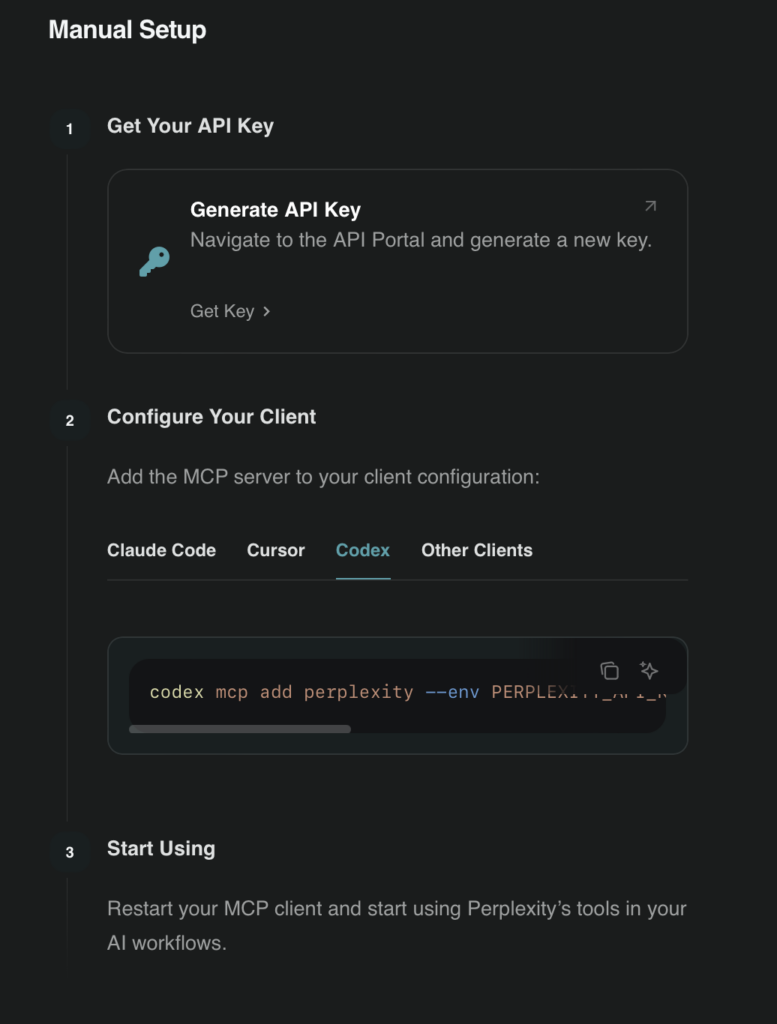
    And that wasn’t the only thing I built. I wanted to test out a real use of an MCP, and decided to use Perplexity’s Search API. I have a more than passing curiosity about Formula 1 and with the latest news about the upcoming 2026 season, I wanted to see if I could use Codex + Perplexity MCP to build my own 2026 F1 Season Tracker. Setting up the MCP was easy enough, updated the config.toml file (See screenshot below)

    …And that was it. I had to re-generate and update my Perplexity key once due to some finickiness on my end (I had no chill and didn’t follow the ridiculously easy instructions in order). And then restarted Codex. I first prompted Codex to search for the full 2026 F1 lineup: teams, race dates, locations, drivers. Codex chose to use the Perplexity MCP, pulled a bunch of information together, and then formatted it into a nice table.

    Then, here’s the fun part, I told it to build me an F1 tracker as a webpage with racing themed styling, and some modern animations. Nothing else. And then this beauty showed up.

    A few of the dates are wrong; and I think that’s from a timezone / daylight savings time conversion of sorts.

    But look at it! Track outlines with animation. Clean formatting, a world map with pins you can hover on. A date countdown. To me, the seamless handoff between research prompt and visualization is amazing. With this proof of concept, I can see quite a few use cases centered around compiling deep research data and visualizations. In my running Notion page titled “Idea List, Brain Dump, Thoughts, Musings, Future Explorations” I keep a tally of future “experiments”. One of them is to get a sense of the shift in social norms through popular songs and lyrics. I have barely any idea of how to go about it other than to pull a bunch of song lyrics, analyze them for recurring patterns, and then show them in a visualization. There’s a ton of skillsets required, probably a few advanced degrees, and definitely some career experience required to do this for fun. But now, I think I might be able to dabble and indulge a whim. Or at the very least, understand how out of my depth I might be.

    All in a few hours of work and one half-pint of Ben & Jerry’s!

  • I Built a Thing!

    I know. I’ve been talking about showing something I’ve but for quite some time now. I finally have something.

    Here it is. It’s a small D3JS rendered Process Tree that I built to outline an area I work with heavily: non-profit operations.

    As a consultant, I specialize in helping non-profits operationalize their technology: which is a fancy way of saying I ask questions, break down processes, and find ways for technology help streamline and enhance it. I built this process tree in order to help other non-nonprofit consultants get up to speed on what is really an entirely different world from the usual for-profit companies that they’re used to (we’re a small but mighty contingent). A tool like this enables consultants that I work with to make the most of what they’re doing, get up to speed quickly and help our clients more efficiently. It’s certainly faster and more reference able than a YouTube video, a bunch of articles, or asking me every question they can think of, when they think of it via Teams.

    One of the things that I’m really proud of is that this process tree (although it’s in a very simplistic original form and will need a lot of enhancements) takes a consultant who wants to effect positive change in the world, but may struggle with the barrier of entry into this insular world, and gives them the reference tools and confidence to do operate in a world that they may not be used to; it opens the door to a broader pool of resources who can help our non-profits do more with what resources they have. Especially in a time where the availability of those are far from certain and liable to change at any moment.

    I built this with Codex. In one weekend. I did a lot of the research and Codex extended it. It formatted it into the visualization you see. Right now it just runs on a local server. But it’s small, and it might be ugly, but I love it and it’s mine, and to me, it’s just short of superpowers.

    https://www.loom.com/share/c141a6ab4cf84853a2fb856baf8ce63f

  • The Second Divide: Who Benefits Most From AI

    Continuing off of the last discussion around ‘The Death of Mid’…

    There’s another split forming, and it has less to do with the divide in quality of work and more to do with a division in how people think. It’s a random musing of thoughts, but bear with me.

    AI works best when problems are decomposed, steps are explicit, sequences are clear, and constraints are articulated. This kind of thinking—process thinking, decomposition, sequential reasoning—has traditionally been strongest in engineering, architecture, and systems design.

    What we started to see in mid 2025 with Claude Code agents / skills / subagents and will see much more in 2026 are people who already think this way translating ideas into structured steps, feeding them into AI, and dramatically accelerating their output. Case in point: Cursed – a Gen Z programming language from the mind of Geoffrey Huntley.

    So What’s Your Point?

    Let’s take the opposite end of the spectrum:

    AI struggles with ambiguity, emotional nuance, and situation-specific judgment. You can’t write a universal, step-by-step playbook for great sales without drowning it in caveats.

    However—if someone can decompose their own expertise—how they build trust, how they read a room, how they sequence conversations, how they adjust based on signals—then AI can amplify that.

    The Pattern Beneath Everything

    This all points to a deeper truth about expertise. Mastery isn’t magic.

    It’s the ability to do something badly, then do it acceptably, then do it well, then understand why it works, and finally know when to break it and create something new. In martial arts, it’s known as Shu-Ha-Ri (roughly translated to “obey”, “digress”, “separate”)

    AI is phenomenal at the Shu. But humans still dominate Ha and Ri: understanding why something works and knowing when to break the rules to create something innovative and original.

    The future of work won’t belong to people who fight AI—or people who blindly rely on it. It will belong to those who understand their craft deeply enough to translate itdecompose it, and extend it.

    It’s the end of the middle, the death of Mid, and the beginning of something sharper.

    Note of full disclosure: I wrote most of this using Wispr and Notion’s internal writing AI refinement tools. The words are my own, proofread and edited thoughts from a human (me), by a human (also me), with an AI meddling in the middle (supervised and berated, by me).

  • The Death of ‘Mid’

    I’ve been thinking about what AI is actually going to do to how we work—not in the hype-cycle sense, but in the practical, lived, day-to-day reality sense. Not “AI will replace all jobs” or “AI will make everyone 10x”, but something more subtle and, I think, more disruptive.

    The short version: I don’t agree with the common sentiment that AI will replace X or Y.

    I think it will cause a rift, a tectonic division of plates that were once fused to form a cohesive Gaussian distribution landmass.

    But first, this diversion to background context…

    The Triangle We’ve Always Lived With

    There’s this well-known triangle in consulting. Or at least, I see it all the time in consulting: Fast, cheap, or high quality. You only ever get to pick two.

    If you want it fast and cheap, quality suffers. If you want it cheap and high quality, it takes time. If you want it fast and high quality, it won’t be cheap.

    Historically, most work settles into the middle of two circles. Not fast, not slow. Not cheap, not expensive. Not bad, not exceptional. Just… acceptable. Middle-speed. Middle-cost. Middle-quality. Unless you explicitly optimize or subsidize one side, you get…middling. Exceptions include the space shuttle (heavily subsidized for fast), whatever the Vatican owns (soooooo not cheap), and Q Branch for James Bond.

    AI Breaks that Center of the Distribution

    Instead of most work clustering around the middle, we’re going to see a divergence. One end pushes toward very fast, very cheap, lower-quality work. The other end pushes toward very slow, very expensive, extremely high-quality work.

    I predict that the middle, the average, the generalist, “good enough” output will start to disappear due to the sheer speed of repetition, and the repetition of the masses.

    AI is trained on the corpus of human knowledge. And human knowledge, when you look at it statistically (and self referentially), is overwhelmingly average.

    AI works the same way. It excels at producing the center of the distribution—best practices, common patterns, typical solutions, established conventions. Most codebases, processes, and operational knowledge live here simply by the fact that most projects, most development, and most human output balances numerous real-world factors (time, money, skills) and rarely over indexes on any one factor.

    And now, with that quality of work rapidly reproducible, it becomes devalued.

    But the best work won’t.

    High-end work—true excellence—is rare. It’s contextual. Situational. Nuanced. And usually less constrained in some way. It breaks common rules designed for common constraints.

    I saw a breakdown recently of the cinematography in Sicario, focusing on lighting, framing, blocking, and movement. There are rules for almost every type of mood, aesthetic, and scenario that one can conceive of. After all, visual storytelling is almost as old as our species. The analysis in the video itself was incredible—but what stood out was the choices made, and how well they contradicted the common rules in order to produce outstanding effects.

    An example: in Western cultures, visual motion typically flows left-to-right and top to bottom, like how we read. It’s ingrained in us. In a pivotal scene, a group of soldiers moves across screen from left to right, descending into pre-dawn twilight. The scene creates unease and quite literally shows a descent of archetypal good into darkness. The choice was deliberate, layered, and aligned with the film’s moral descent.

    That kind of expertise demonstrated in that scene (and the move overall) is incredibly rare: in this case, it’s the work of the renowned Roger Deakins. It’s bespoke. And it’s hard for AI to replicate because it doesn’t show up often enough in the training data.

    The Best Won’t Compete With AI—They’ll Extend Themselves With It

    This is where things get interesting.

    The best coders, designers, presenters, strategists—the people who already operate at the high end, are the Roger Deakins of their craft. And as such, they aren’t threatened by AI. They’re amplified by its ability to provide commonality at speed. They can use it to extend their creative breathing room. Get the repetitive stuff done faster to spend more time and money on paradigm breaking.

  • It comes back to reading…

    I’ve been building this weekend. It felt really good. Mostly just exploring some ideas in Replit, Codex, and Claude. Yes, I’ve been using all three. There are some overlaps, some distinct quirks, and some ease of use aspects. I am by no means an expert in any of the tools, and so most of this exploration in how to break an idea down, and utilize their respective capabilities to benefit my aims. One of the obvious conclusions I’ve learned is that not everything is an app.

    Yeah, totally obvious. For someone who has almost no formal technical background, it’s a groundbreaking level of understanding. And while this could turn into an indictment of every “hello world” tutorial I’ve done and then subsequently quit, there were some truly simple levels of understanding that came together in the moments of playing around with the various agents. I started to see the pros and cons of deterministic vs nondeterministic code. I started to understand where a Python or Bash script could be more useful than Javascript with a slick UI.

    And then the technology starts to become clearer. Where there’s hype – AI will NOT solve everything and it definitely has downsides. And where it’s just like other technologies – it will change the way we work – in some of the ways we assume and some that we don’t see coming. It feels a lot like cars. Horses weren’t outright replaced (try driving the Grand Canyon) and cars weren’t perfect overnight: here, the infrastructure piece is critical. AI will need roads…and given how much is being spent on data centers and the like, maybe we’ll see a bicycle effect: because roads exist, biking becomes more adoptable.

    So maybe there’s a question there: what’s the equivalent of biking when it comes to all this new technology? Something cheap, efficient, mildly counterculture but also sustainable and human?